These instructions are for Armorsmith Designer 2.1.1.0. Earlier versions, including 2.1.0.10, can show different panels and labels.
Preferences
Preferences are divided into four tabs:- General — Language, environment, autosave, and Color Key settings.
- Measurements — Units, grid spacing, and snapping settings.
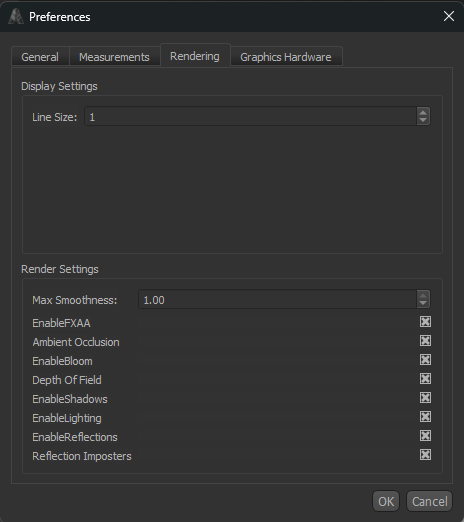
- Rendering — Display-effect switches.
- Graphics Hardware — Requested and current graphics processor.
General
The General tab contains settings that control general application behavior.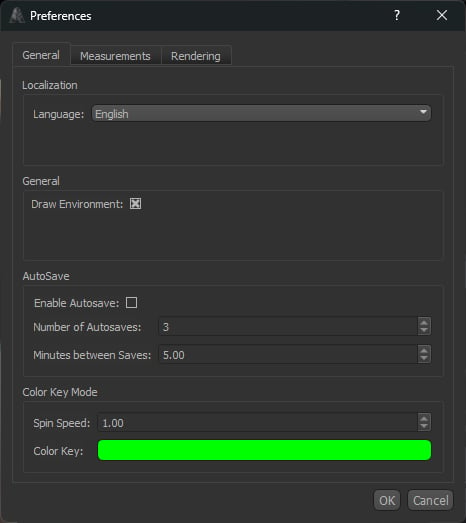
Localization
Language
Language
Selects the language used throughout the Armorsmith Designer interface.A restart may be required for all interface elements to update after changing the language.
General
Draw Environment
Draw Environment
Controls whether the 3D environment surrounding the Work Area is displayed.Disable this option if you prefer a simple background or want to reduce the amount of environment geometry being rendered.
AutoSave
Autosave can periodically save backup copies of your work while you are using Armorsmith Designer.Enable Autosave
Enable Autosave
Enables or disables automatic saving.
Number of Autosaves
Number of Autosaves
Sets the number of autosave files Armorsmith Designer will keep.Older autosaves are replaced as new autosaves are created once this limit is reached.
Minutes Between Saves
Minutes Between Saves
Sets how frequently an autosave is created, measured in minutes.
Color Key Mode
Color Key Mode provides controls for the rotating color key used when viewing your project.Spin Speed
Spin Speed
Controls how quickly the Color Key rotates.
Color Key
Color Key
Sets the color used by the Color Key.
Units & Snapping
The Measurements tab controls the measurement system, grid, and snapping behavior used throughout Armorsmith Designer.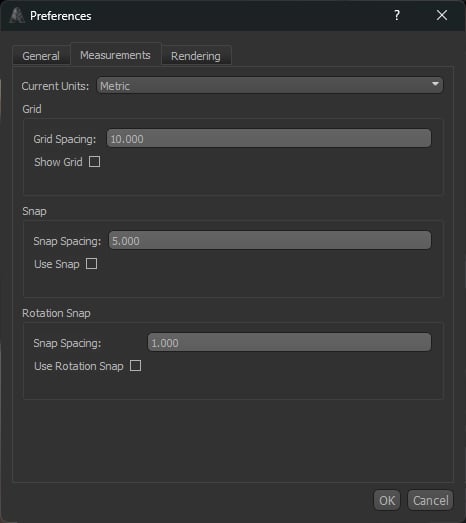
Current Units
Current Units
Current Units
Selects the measurement system used to display dimensions throughout Armorsmith Designer.Changing the current units changes how measurements are displayed but does not change the physical size of your project.
Grid
The grid provides a visual measurement reference within the Work Area.Grid Spacing
Grid Spacing
Sets the distance between each line of the grid.
Show Grid
Show Grid
Controls whether the measurement grid is displayed in the Work Area.
Snap
Position snapping constrains movement to fixed increments, making it easier to precisely position objects.Snap Spacing
Snap Spacing
Sets the distance between each position snapping increment.
Use Snap
Use Snap
Enables or disables position snapping.
Rotation Snap
Rotation snapping constrains object rotation to fixed angular increments.Snap Spacing
Snap Spacing
Sets the angle between each rotation snapping increment.
Use Rotation Snap
Use Rotation Snap
Enables or disables rotation snapping.
Position Snap and Rotation Snap are independent. You can enable either option individually or use both at the same time.
Rendering
Graphics Hardware
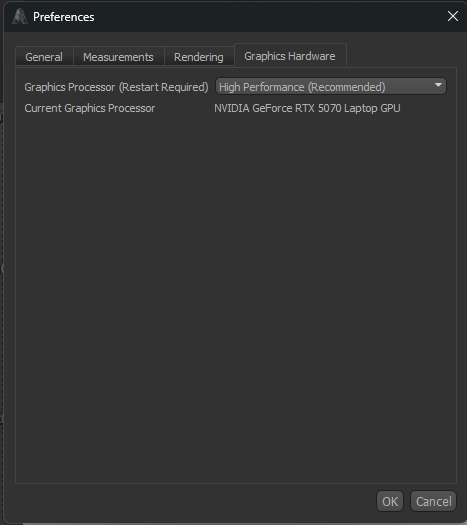
Current Graphics Processor shows the active adapter. Restart Armorsmith after changing the requested processor, then check that value again. Help → About also reports the graphics processor, which is useful when describing a rendering problem.
An unavailable saved adapter can appear as Unavailable Adapter (Use Fallback). Choose an available device or a preference mode and restart.