Activate the tool
- Left-click a part in the Costume Viewport to select it.
- Click Rotate, the circular-arrow button in the toolbar above the viewport.
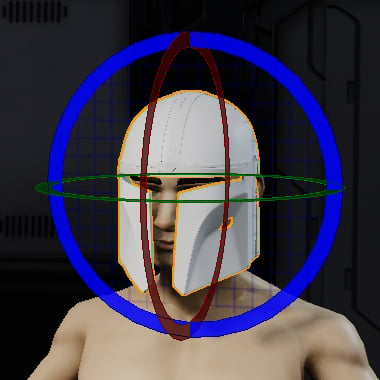
- Drag a colored ring to rotate the part around that axis. Release the mouse button when the part has the orientation you want.
Use the rotation rings
Drag one ring at a time to control the axis of rotation. Orbit the view to check the result from several angles.
Choose Local or World coordinates
The Transform Mode in the Transform Panel determines the axes used by the tool.- Local follows the selected part’s orientation. Use it to rotate a part around its own axes.
- World uses the fixed scene axes. Use it to align a part relative to the avatar and the rest of the costume.
Enter an exact angle
For precise alignment, select the part and edit X, Y, or Z in the Rotation section of the Transform Panel. The values are measured in degrees and use the selected Transform Mode.Example: orient a helmet
- Select the helmet and activate Rotate.
- Choose World in the Transform Panel.
- Drag the green Y ring to turn the helmet left or right.
- Use the red X ring to adjust its forward or backward tilt, and the blue Z ring to adjust its side-to-side tilt.
- Orbit the view to check the fit from the front and side.