These instructions are for Armorsmith Designer 2.1.1.0. Earlier versions, including 2.1.0.10, can show different panels and labels.
Start with the shape you want to cut from a flat foam sheet. Promote a closed outline to a foam pattern, set its thickness, and inspect the formed result in Workshop’s 3D view. The flat outline stays available for cutting and paper layout.

Start a foam pattern

  1. Open Workshop and select or create a workspace.
  2. Use Create above the pattern view to draw a line, rectangle, or circle.
  3. Use Edit Shape to finish a closed, non-crossing outline.
  4. Right-click the selected outline and choose Promote To Foam Pattern.
  5. Click Edit Foam above the 3D view. Its controls open in Workbench → Edit.
An open path is drawing geometry. Close it and give it a valid area before promoting it to foam.

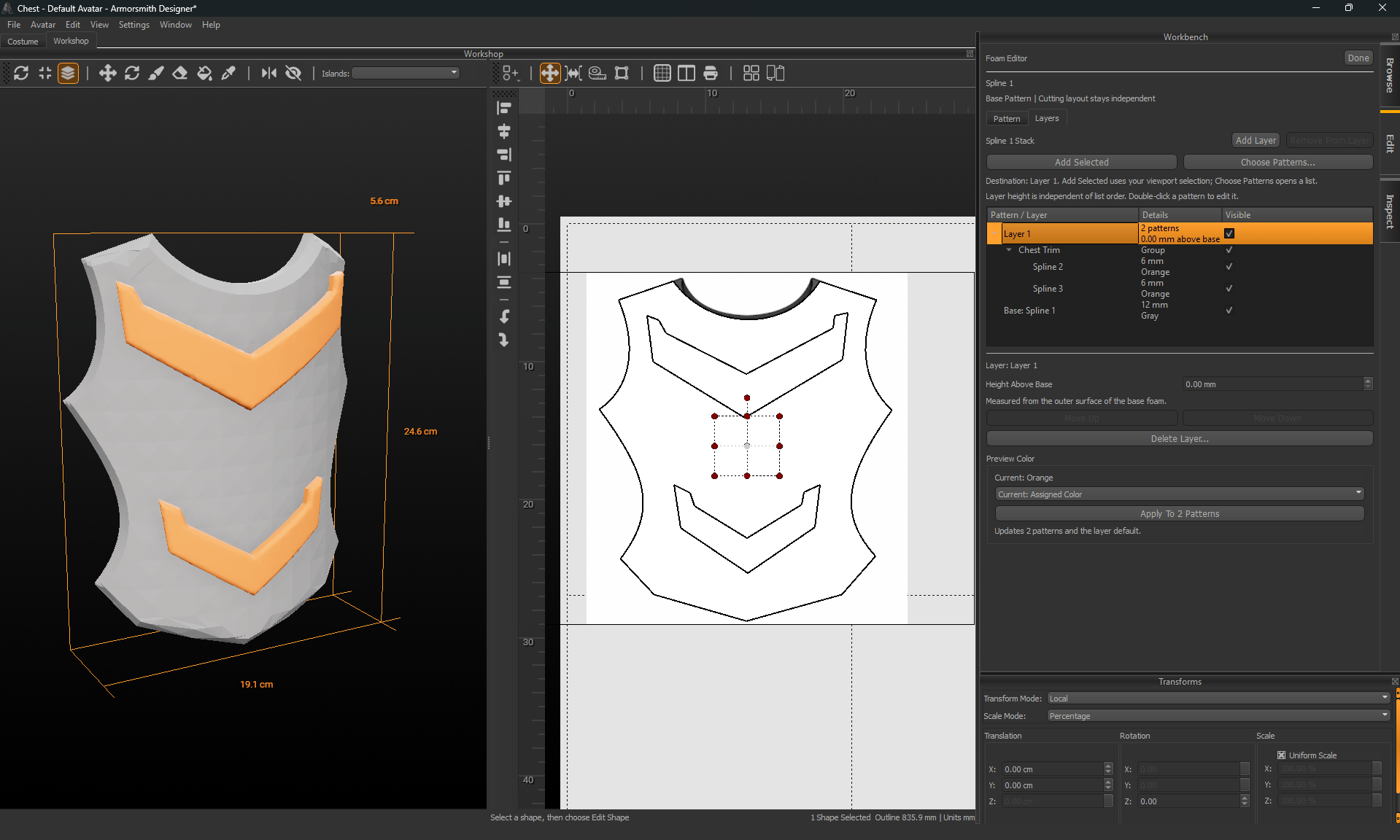
Use Pattern and Layers

Formed gray chest armor with two orange raised chevrons beside flat outlines and expanded foam layer controls. A formed foam stack and its flat cutting outlines share geometry while retaining separate placement. The Pattern tab holds thickness, forming, triangle budget, edge finish, preview color, and placement controls. The Layers tab composes smaller patterns over a base. A layer member inherits its base’s forming while keeping its own thickness and edge finish. Use Done when you finish the editor. A flat paper-layout move and a formed 3D placement are separate edits.

Choose a guide

Understand the limits

Forming is a geometric design preview. It does not predict heating, foam stretch, glue behavior, or springback. Test a physical sample, especially for spherical forming. The Printable Details control can appear in the editor, but decorative detail placement is not covered by this guide. Decorative hardware placement is not part of this documented workflow. Foam build sheets and automatic model-derived Create Patterns are also unavailable through their release entry points. Use ordinary pattern printing for the flat cut outlines and record construction notes separately.