> ## Documentation Index
> Fetch the complete documentation index at: https://armorsmith-designer.mintlify.site/llms.txt
> Use this file to discover all available pages before exploring further.
# Patterns workspace
> Find your way around the 3D model, unfolded patterns, and page layout.
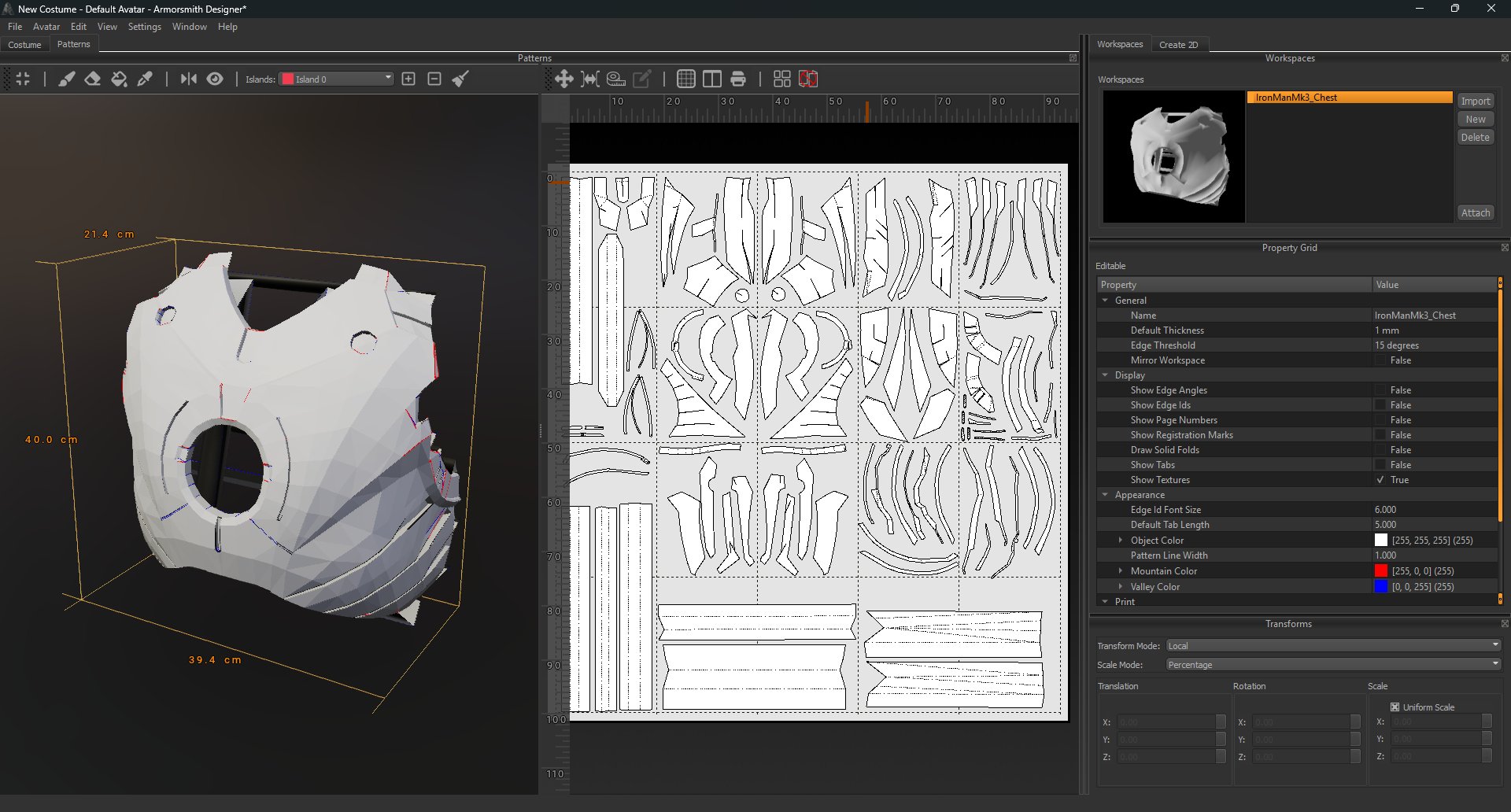
The Patterns workspace places your 3D model beside its unfolded, printable patterns. Use the model view to see where pieces come from, then work with the pieces and pages in the pattern view.
 ## Find your way around
| Area | What you'll find there |
| - | - |
| **3D model view** | The model and the island tools above it. Select an island to work on a particular area of the model. |
| **Pattern view** | The unfolded pieces arranged on pages, with rulers along the top and left. |
| **Workspaces** | Your model workspaces and their import, creation, deletion, and attachment controls. |
| **Property Grid** | Settings for the selected workspace, including pattern display and appearance options. |
| **Transforms** | Position, rotation, and scale fields for a selected item when those controls are available. |
## Show the details you need
Select a workspace and expand **Display** in the Property Grid. You can choose whether the pattern view shows edge angles, edge IDs, page numbers, registration marks, fold lines, tabs, and textures.
If the page looks busy, hide the details you don't need while arranging pieces. Turn them back on when checking the layout before printing.
## A typical workflow
1. Choose the workspace containing the model you want to work on.
2. Create islands on the 3D model to define areas you want to work with.
3. Watch the island patterns update in the pattern view as you edit the islands.
4. Inspect and arrange the pattern pieces on the pages.
5. Check the display and print settings before printing.
See [Create and manage islands](/patterns/create-and-manage-islands) for the tools above the 3D view.
## Find your way around
| Area | What you'll find there |
| - | - |
| **3D model view** | The model and the island tools above it. Select an island to work on a particular area of the model. |
| **Pattern view** | The unfolded pieces arranged on pages, with rulers along the top and left. |
| **Workspaces** | Your model workspaces and their import, creation, deletion, and attachment controls. |
| **Property Grid** | Settings for the selected workspace, including pattern display and appearance options. |
| **Transforms** | Position, rotation, and scale fields for a selected item when those controls are available. |
## Show the details you need
Select a workspace and expand **Display** in the Property Grid. You can choose whether the pattern view shows edge angles, edge IDs, page numbers, registration marks, fold lines, tabs, and textures.
If the page looks busy, hide the details you don't need while arranging pieces. Turn them back on when checking the layout before printing.
## A typical workflow
1. Choose the workspace containing the model you want to work on.
2. Create islands on the 3D model to define areas you want to work with.
3. Watch the island patterns update in the pattern view as you edit the islands.
4. Inspect and arrange the pattern pieces on the pages.
5. Check the display and print settings before printing.
See [Create and manage islands](/patterns/create-and-manage-islands) for the tools above the 3D view.